
Boho Casino in Your Pocket
We are Boho Casino, and this guide explains mobile browser access on Android and iOS. Compare opening the site directly with adding a home-screen shortcut, see the screens shown below and find the account checks to make before a deposit. Use the browser menu to save a shortcut and keep the destination easy to recognise when you return.

Boho Casino App: What You Get on Your Phone
A plain rundown of the games, payments and bonus you can reach from a mobile screen.
We are Boho Casino, and this page covers what our app gives you on a phone or tablet. The short version: the same lobby you see on desktop, sized for a smaller screen. Slots, live tables, poker and the sportsbook all sit behind one login, and your AUD balance follows you between devices.
The game list comes from studios with a track record. Evolution runs the live dealer side. Pragmatic Play, NetEnt and Push Gaming fill out the slots. If you want to start with the familiar titles, Gates of Olympus, Book of Dead and Starburst all load on mobile without a separate download for each game.
Payments use the same cashier you would use on a computer. You can choose Visa, Mastercard or Maestro, the e-wallets Skrill, Neteller, MuchBetter and ecoPayz, prepaid Paysafecard, or crypto: Bitcoin, Ethereum, USDT and TRON. Minimums and processing times change by method, so check the cashier before you commit funds.
New players can claim the welcome offer from the app as well: a 100% match plus 225 free spins. Read the wagering terms first. Then install, sign in and play to your own limits.
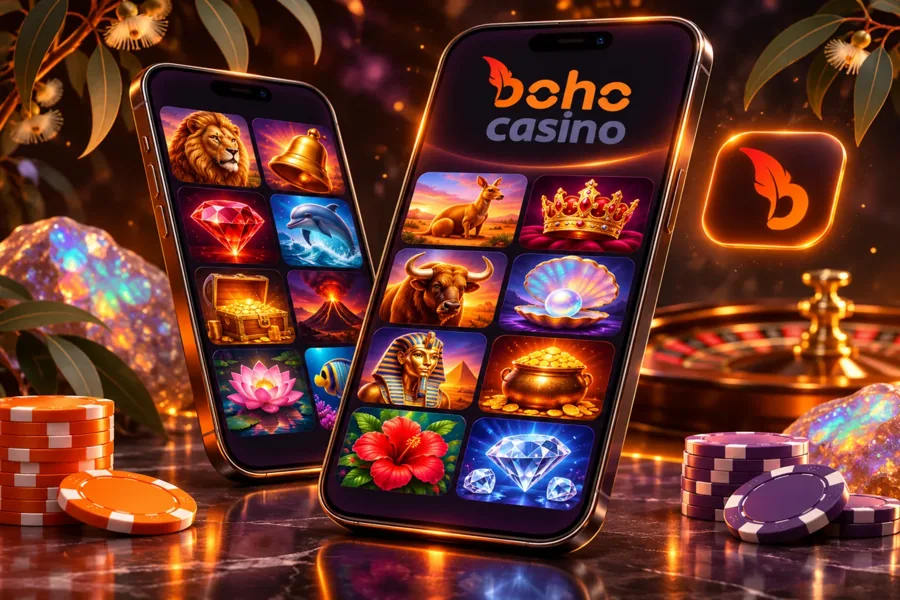
Mobile Browser or Home-Screen Shortcut
Two ways to return to the same mobile website.
Open Boho Casino in your mobile browser to use the website directly. A home-screen shortcut offers another route back to that address. It does not by itself establish that a separate native app or APK is available. The instructions below cover browser access and the shortcut options supplied by your phone.
The browser remains responsible for loading the page, storing site data and asking for permissions. Adding a shortcut does not make the site work offline or guarantee that a session stays signed in. If you clear browser data, change browsers or use a private tab, you may need to sign in again.
Choose the route that is easier to recognise on your device. Keep the browser updated and check the destination before entering credentials. If the operator presents a separate installation option, read its current device requirements there; this guide does not confirm a downloadable Android package.
| Feature | Browser access | Home-screen shortcut |
|---|---|---|
| Setup | Open the website in a supported browser | Add a shortcut using the browser or share menu |
| Destination | The address loaded in the current tab | The address saved when the shortcut was added |
| Storage | Browser cache and site data | Browser data and shortcut information; this is not an APK claim |
| Updates | Website content loads from the server | The shortcut opens the website; keep your browser updated |
| Account session | Depends on cookies and the sign-in state | May require signing in again after browser data changes |
| Offline use | Not established by this guide | A home-screen icon does not establish offline support |
| Payment checks | Review the current cashier and selected offer | Review the same account-specific information after opening the site |
Boho Casino on Android
Open the mobile website and add a shortcut if your browser offers the option.
On Android, begin with an up-to-date mobile browser. Open the operator website and let the page finish loading before signing in. You can continue in the tab without downloading a file. This is the browser route described here; it does not require enabling installation from unknown sources.
A home-screen shortcut saves a route back to the address you have opened. Its name and appearance depend on the browser and the website. If the browser offers an installation option, read the prompt rather than treating every home-screen icon as a native application. You can keep using the website in a browser tab if a shortcut option is not available. Keep the browser updated so navigation and sign-in controls can use its current features.
Open the mobile website
Use your normal browser and check the domain before entering any account details. Keep the page in the foreground while it loads.
Review the page first
Confirm that the menu and sign-in controls load. If the page is incomplete, retry the connection before attempting a payment.
Open the browser menu
Look for Add to Home screen or the equivalent shortcut option. Menu wording varies with the browser version.
Read the shortcut prompt
Check the address and the name being saved. Confirm only the option you understand; these steps do not call for an APK download.
Open the saved icon
Check that it returns to the intended website. Sign in again if the account session has expired or browser data was cleared.
Keep access private
Use your own device profile, a screen lock and the account security options available to you. Avoid saving credentials on a shared phone.
Boho Casino on iPhone and iPad
Use Safari directly or save a home-screen shortcut.
The mobile website can be opened directly in Safari. You can also use Add to Home Screen to save a shortcut to the page. A shortcut is a convenient entry point; it is not proof of an App Store listing or a separate native download. The way it opens can depend on the site and the iOS version.
Check the address before saving the icon, especially if you have moved through several pages. Website content is loaded when the page opens, while Safari and iOS updates are handled on the device. Browser cache and site data can still use storage. Clearing that data may remove the sign-in state even when the home-screen icon remains.
Open Safari
Load the operator website in a normal tab. Wait for the page and its navigation to appear.
Check the destination
Review the domain in the address bar before signing in or adding a shortcut.
Open the Share menu
Find the Share control in Safari. Its position can vary between iPhone, iPad and browser versions.
Add the home-screen shortcut
Choose Add to Home Screen if available, review the saved name and address, then confirm.
Reopen and check the account
Launch the new icon and sign in if requested. Review the current account currency and cashier options before a transaction.
Full Boho Casino App Features
What the app gives you on a phone, listed item by item.
Full slots lobby
The mobile lobby carries the same slots as the desktop site, from Pragmatic Play, NetEnt and Push Gaming. Gates of Olympus, Book of Dead and Starburst load in portrait or landscape.
Live casino tables
Evolution streams its live dealer tables straight to the app. Blackjack, roulette and game shows adjust to the screen size, and bet buttons stay large enough to tap.
Sportsbook and poker
Sports betting and poker sit in the main menu, next to the casino. You use one balance in AUD for every product, so you never move money between wallets.
Cashier on the move
You can deposit with Visa, Mastercard, Maestro, Skrill, Neteller, MuchBetter, ecoPayz or Paysafecard. Crypto users get Bitcoin, Ethereum, USDT and TRON. Check the cashier for current limits.
Welcome offer access
New players can claim the 100% welcome bonus with 225 free spins from inside the app. Read the terms on the promotions page before you deposit.
Operator support
Boho Casino's live chat and email support can both be reached from the app menu. Use live chat first if you need an answer quickly.
Boho Casino App Screenshots
Six reference screens from the operator interface, labelled by what they actually show.
These captures show the home lobby, casino catalogue, live games, a bonus-wagering selection, an individual game introduction and the tournament list. Use the lobby views to recognise the menu and provider controls. The game screen shows where a title presents its rules, while the tournament view groups a different kind of event information.
A captured banner or currency is part of the reference image. Offer amounts, currencies and available options can change. For payment availability or promotion terms, use the current screen in your account. Check the currency and conditions there before deciding whether a particular offer or payment option suits you.
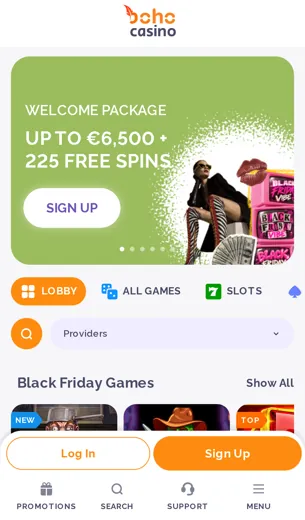 Home lobby
Featured games and the main navigation, including links to the catalogue, promotions and account controls. Banner details may differ from the current offer.
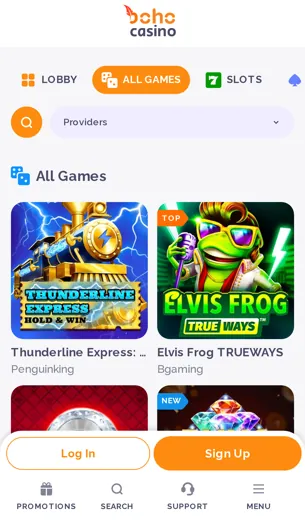 Casino catalogue
The game catalogue view, with category navigation and a provider selector.
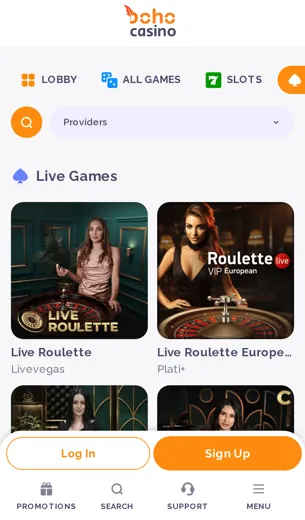 Live games lobby
The live-game catalogue shown in the operator interface.
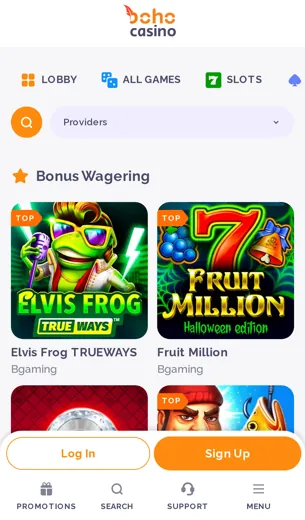 Bonus wagering games
A selection headed Bonus Wagering. It shows a game list, not a payment screen.
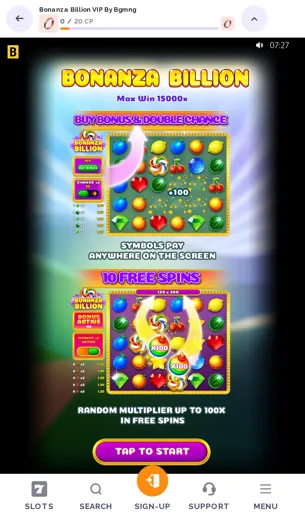 Bonanza Billion game introduction
The title screen explains symbols and features for this individual game.
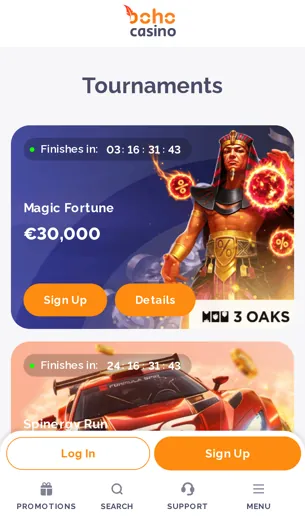 Tournament list
The tournament listing view. Current participation terms must be checked in the account.
First Deposit Bonus on the Boho Casino App
A 100% match and 225 free spins, claimed the same way on mobile as on desktop.
Our first deposit bonus is a 100% match on your opening payment plus 225 free spins. Make your first deposit in AUD and the bonus funds match that amount. The spins go on selected slots from providers such as Pragmatic Play, NetEnt and Push Gaming, so you might land on titles like Gates of Olympus, Book of Dead or Starburst, depending on the current promotion.
Claiming it on the app takes a few steps. Register, open the cashier, choose a method and confirm the deposit. Visa, Mastercard, Maestro, Skrill, Neteller, MuchBetter, ecoPayz and Paysafecard are all accepted, and so are Bitcoin, Ethereum, USDT and TRON if you prefer crypto. The minimum deposit, wagering requirement and maximum bet while the bonus is active are listed in the promotion terms. Read them before you pay, because they decide how fast bonus money turns into cash you can withdraw.
Free spins usually come with their own expiry window. Use them while they are valid and keep track of your bonus balance in the account section.
- Match: 100% of your first deposit
- Extra: 225 free spins on selected slots
- Currency: AUD or supported crypto
- Terms: check the promotion page for current minimums and wagering
Installing the app does not change the welcome offer. You get the same 100% match and 225 free spins whether you sign up on mobile or desktop. Claim it once per player, on your first deposit, and check the cashier for any active bonus code before you confirm payment.
Boho Casino App FAQ
Straight answers on the app, accounts, bonuses and payments.
Is the Boho Casino app legit?
Boho Casino holds a Tobique licence and runs games from established studios such as Evolution, Pragmatic Play, NetEnt and Push Gaming. Full licence details are in the legal section further down this page.
How can I tell if a casino app is legit?
Check three things. First, a named licence you can look up. Second, games from known providers. Third, clear bonus terms and a working cashier. If any of these is missing, walk away.
Can I gamble online from Australia?
Australian law limits which online casino services can be offered locally. Boho operates under an offshore licence. Check the rules that apply to you before you sign up.
How do I verify my account?
Upload a photo ID and proof of address in your profile. You may be asked for this at registration, before some deposits, or when you request your first withdrawal. Have the documents ready early.
Should I turn on two-factor authentication?
Yes. It takes a minute and adds a code from your authenticator app at login.
What is the welcome offer?
New players can claim a 100% deposit match plus 225 free spins. Read the bonus terms in the app for the minimum deposit and other conditions.
What is a wagering requirement?
It's how many times you must play through a bonus before you can withdraw winnings from it. The exact multiplier is listed in the terms of each offer.
Which payment methods work in the app?
Visa, Mastercard, Maestro, Skrill, Neteller, MuchBetter, ecoPayz, Paysafecard, plus Bitcoin, Ethereum, USDT and TRON. All in AUD or crypto. The cashier shows which ones you can use to withdraw.
What is the least risky casino game?
Table games like blackjack and baccarat usually have a lower house edge than most slots. No game removes risk, so set a limit before you play.
What is the $20 method?
It's a simple bankroll rule: you bring a fixed $20 and stop once it's gone. It doesn't improve your odds. It just keeps your spending under control.
Which slots are most popular?
Gates of Olympus, Book of Dead and Starburst are among the most played titles in the app.
How do I reach support?
The operator offers live chat and email inside the app. For questions about this website, write to [email protected].